
Are HDMI cables directional? It depends on the cable type: passive HDMI cables are not, so either end can be the source or the display, while active copper and fiber optic HDMI cables are, and they only pass a signal when their marked source end feeds your source device.
The verdict: run length decides it. Under 15 feet, passive HDMI wins: it is cheaper, works in either direction, and carries every feature including ARC and eARC. Past 15 feet for 4K, active HDMI wins, with one hard rule: active cables are directional, so install source to display or you get no signal at all.
We Just Fixed a Backwards HDMI Run. Here's Why It Matters
We got called out to a residential job in Clarksville where another contractor had run an active HDMI cable backwards through the wall. The screen showed nothing: no signal, no error message, just black. The cable tested fine with a continuity tester. The source device worked on a short cable. Everything checked out except the 40-foot in-wall HDMI run.
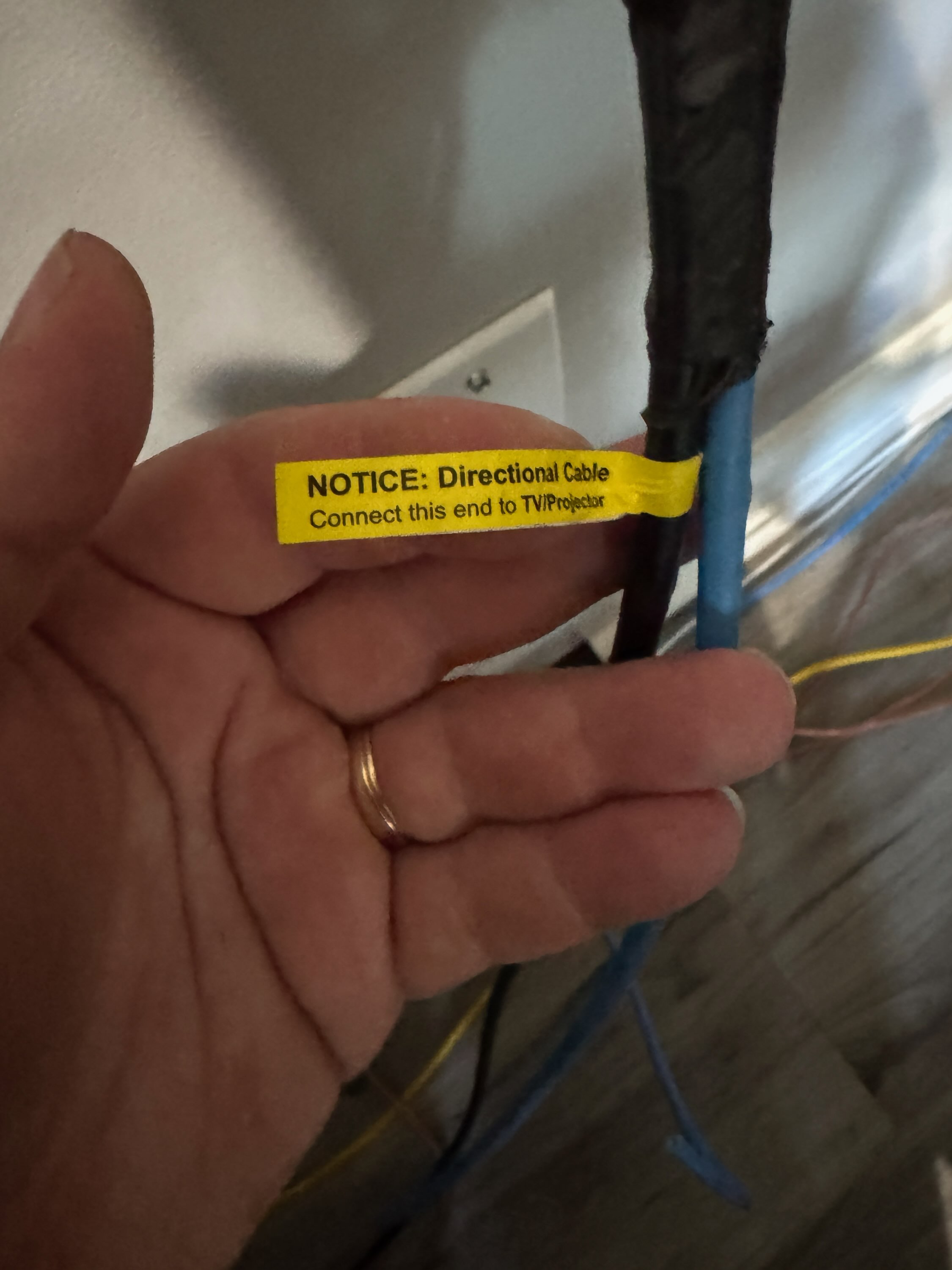
A directional active HDMI cable we found installed backwards at a residential job in Clarksville, TN; no signal until re-pulled in the correct direction.
The problem? The active HDMI cable was installed backwards. Active HDMI cables have built-in electronics that only amplify the signal in one direction: source to display, no exceptions. But here's the catch: a passive cable works either way, and most contractors who haven't pulled active HDMI before assume the same rule applies. Run it backwards and you get zero output: not a degraded picture, not static, just nothing. The cable tests fine. The source device works. But the signal never leaves the wall. The fix required pulling the cable and re-running it in the correct orientation, an expensive mistake that takes 10 seconds of labeling to prevent.
Passive HDMI Cables: Simple, Bidirectional, Limited Range
Passive HDMI cables are what most people picture when they think of HDMI: a copper cable with connectors on both ends. They're the standard cables you buy at any electronics store for connecting a laptop to a monitor or a streaming device to a TV.
How they work: Passive HDMI is dead simple: copper wire, shielding, and connectors. Signal goes in one end, comes out the other. No power, no electronics, no fuss. The tradeoff: over distance, the signal degrades as resistance and electromagnetic interference take their toll.
Pros:
- Bidirectional: Either end can be the source or display. No wrong direction. Plug it in either way and it works.
- No power required: No external power supply or USB power needed.
- Affordable: A quality 6-foot passive HDMI cable costs $5-15.
- Reliable: No electronics to fail. The cable either works or it's physically damaged.
- Supports all HDMI features: ARC, eARC, CEC, Ethernet; all work on passive cables within their distance limits.
Cons:
- Distance limited: Reliable 4K@60Hz is limited to about 15-20 feet (5-6 meters). Beyond that, you start seeing sparkles, dropouts, or no signal at all.
- 1080p extends further: You can push passive cables to 25-30 feet at 1080p, but 4K signals are much less forgiving.
- No good for in-wall commercial runs: If your display is more than 15 feet from the source, passive HDMI is risky for 4K content.
Best for: Short runs under 15 feet: home entertainment setups, conference room tables where the source is close to the display, and any temporary or portable connection.
Active HDMI Cables: Long Range, Directional, Must Install Correctly
Active HDMI cables contain built-in electronics (typically a signal equalizer or redrive chip) that boosts the signal to maintain quality over longer distances. This is what makes 30, 40, or even 100-foot HDMI runs possible without signal loss.
How they work: Active cables have a chip (usually in the connector) that boosts the signal and cleans up timing errors. It compensates for the voltage drop and noise that copper loses over distance, which is how you push 4K video 40+ feet without signal breakup. The chip draws power from the HDMI port itself (5V pin) or from an external USB power source on some models.
Pros:
- Long distance: Supports 4K@60Hz up to 30-50 feet depending on the cable quality. Some premium active cables push 75+ feet.
- Maintains signal integrity: The built-in amplifier compensates for copper signal loss, delivering a clean picture at the display end.
- Thinner and lighter: Many active cables use thinner gauge copper since the amplifier compensates, making them easier to pull through conduit and wall cavities.
- 4K/HDR capable: High-quality active cables support 4K@60Hz 4:4:4, HDR10, and Dolby Vision at distances where passive cables fail completely.
Cons:
- DIRECTIONAL: this is the critical one. Active HDMI cables have a designated source end and display end. They are clearly labeled (usually "Source" and "Display" or "TV" printed on the connectors, or arrows on the cable jacket). If you run the cable backwards, you get NO signal. Not a bad picture, nothing at all.
- More expensive: A 30-foot active HDMI cable costs $25-60 depending on specs. Premium fiber-active cables cost $80-200+.
- Can fail: The built-in electronics can be damaged by power surges or heat, unlike passive cables which have no components to fail.
- May need external power: Some active cables require a USB power source at the display end for longer runs. If you don't plan for this during rough-in, you'll have a power problem at trim-out.
- ARC/eARC may not work: Because the signal is amplified in one direction only, return audio channels (ARC/eARC) may not function on some active cables. This matters for soundbar setups; more on this below.
Best for: In-wall commercial runs over 15 feet: conference rooms, digital signage, worship spaces, restaurant menu boards, and any installation where the source and display are far apart.
Need help with this?
Call (629) 280-2800 or request a free assessment. We respond within 24 hours.
Fiber Optic HDMI Cables: The Premium Long-Distance Option
For runs beyond 50-75 feet, fiber optic HDMI cables replace the copper conductors with optical fiber for the high-speed data lanes while keeping copper for the power and low-speed control signals. These are the go-to for church sanctuaries, large conference rooms, and event venues where the source might be 100+ feet from the display.
Pros:
- Extreme distance: 100 to 300+ feet at full 4K@60Hz with zero signal degradation.
- Immune to EMI: Fiber doesn't pick up electromagnetic interference from power cables, motors, or lighting ballasts running alongside it.
- Lightweight: Much thinner and lighter than equivalent copper active cables, easier to pull through conduit.
Cons:
- Also directional: Fiber HDMI cables are directional just like copper active cables. Same rule: source end to source, display end to display.
- Fragile: Fiber optic cables can't be bent at sharp angles or kinked. Minimum bend radius matters during installation.
- Expensive: $80-300+ depending on length and spec.
- ARC/eARC limitations: Same directional signal issue as copper active cables.
Best for: Long commercial runs over 50 feet: auditoriums, large conference rooms, digital signage with centralized media players, and any installation running HDMI parallel to high-voltage electrical.
HDMI ARC vs eARC: What Contractors Need to Know
ARC lets the TV send audio back to a soundbar or AV receiver through the same HDMI cable that carries video, no separate optical cable (TOSLINK) needed. eARC is the upgraded version with higher bandwidth for lossless audio formats.
ARC (Audio Return Channel)
- Introduced in HDMI 1.4
- Sends compressed audio (Dolby Digital, DTS) from TV to soundbar/receiver
- Maximum bandwidth: ~1 Mbps
- Does NOT support lossless audio formats (Dolby TrueHD, DTS-HD MA, Dolby Atmos via TrueHD)
- Works on most passive HDMI cables
- May not work on active/directional cables because ARC requires bidirectional signal flow on the HDMI cable, and active cables only amplify in one direction
eARC (Enhanced Audio Return Channel)
- Introduced in HDMI 2.1
- Sends uncompressed and lossless audio (Dolby Atmos, DTS:X, 7.1 PCM)
- Maximum bandwidth: ~37 Mbps
- Requires HDMI 2.1 ports on both the TV and the soundbar/receiver
- Uses a dedicated data channel that's separate from the main TMDS lanes
- Requires an HDMI cable that supports the Ethernet channel: most High Speed HDMI cables with Ethernet work, but cheap no-name cables may not
- Same directional cable warning applies: eARC needs return signal capability that most active cables don't support
The ARC/eARC + Active Cable Problem
Here's what happens: A 40-foot active HDMI cable runs from a media closet to a conference room display. Video works. Then a soundbar connects to the TV's HDMI ARC port and audio should flow from the TV back through the cable to the AV receiver. It stops cold: the active cable only amplifies source-to-display. Return audio has no amplification and dies.
The fix: For installations that need both long-distance video AND return audio (ARC/eARC), use a separate audio solution: either an HDMI audio extractor at the display end, a dedicated audio cable run (Cat6 with a Dante/AVB adapter, or balanced analog), or an HDMI over HDBaseT extender system that handles bidirectional signals natively.
How to Avoid Directional HDMI Mistakes on the Job
After pulling cable through walls and ceilings for years, here's what we do at ICTAlly to prevent the exact problem we fixed in Clarksville:
- Label both ends during rough-in. Before pulling the cable, wrap tape around the source end and label it "SOURCE" with a Sharpie. Do the same with "DISPLAY" on the other end. This takes 10 seconds and saves hours.
- Check the cable markings. Most active HDMI cables print "Source" and "Display" (or "TV") on the molded connectors. Some use arrows on the cable jacket. Look for these before you start pulling.
- Test before you close the wall. Connect a source and display and verify the picture works BEFORE drywall goes up. A 5-minute test prevents a $500 re-pull.
- Plan for ARC/eARC upfront. If the install needs return audio, specify this in the design phase. Active HDMI may not be the right cable; consider HDBaseT, fiber with ARC support, or a separate audio run.
- Document the cable direction. In your as-built documentation, note which end is source and which is display. The next technician who touches this cable in 3 years will thank you.
- Use conduit for future flexibility. Whenever possible, install conduit during rough-in rather than direct-burying the HDMI cable. If a cable needs to be replaced or upgraded, conduit makes the re-pull a 20-minute job instead of drywall surgery.
The technician who touches this cable in 3 years won't remember what you were thinking today. Label it, test it, document it, so they don't have to guess.
Quick Reference: Which HDMI Cable Do You Need?
| Scenario | Cable Type | Directional? | ARC/eARC? | Cost |
|---|---|---|---|---|
| Under 15 ft, any resolution | Passive HDMI | No | Yes | $5-15 |
| 15-50 ft, 4K@60Hz | Active HDMI (copper) | YES ⚠️ | Usually no | $25-60 |
| 50-100+ ft, 4K@60Hz | Fiber optic HDMI | YES ⚠️ | Usually no | $80-300 |
| Long distance + return audio | HDBaseT over Cat6 | N/A (uses Cat6) | Yes (built-in) | $200-500 |
| Long distance + 4K + ARC | Fiber HDMI + audio run | YES ⚠️ | Separate run | $150-400 |
Don't Let a Backwards Cable Ruin Your Install
If you're planning an AV system with cable runs over 20 feet, the difference between passive and active HDMI (and the installation direction) directly impacts whether your system works the first time or costs you a re-pull. ICTAlly designs and installs commercial AV systems and AV cabling for conference rooms, restaurants, churches, and corporate spaces across Clarksville, Nashville, and Middle Tennessee. Every cable is labeled at both ends, tested before drywall closes, and documented in your as-builts, so the next technician knows exactly what they're touching.
Get a free AV cabling assessment or call (629) 280-2800 to discuss your rough-in design.